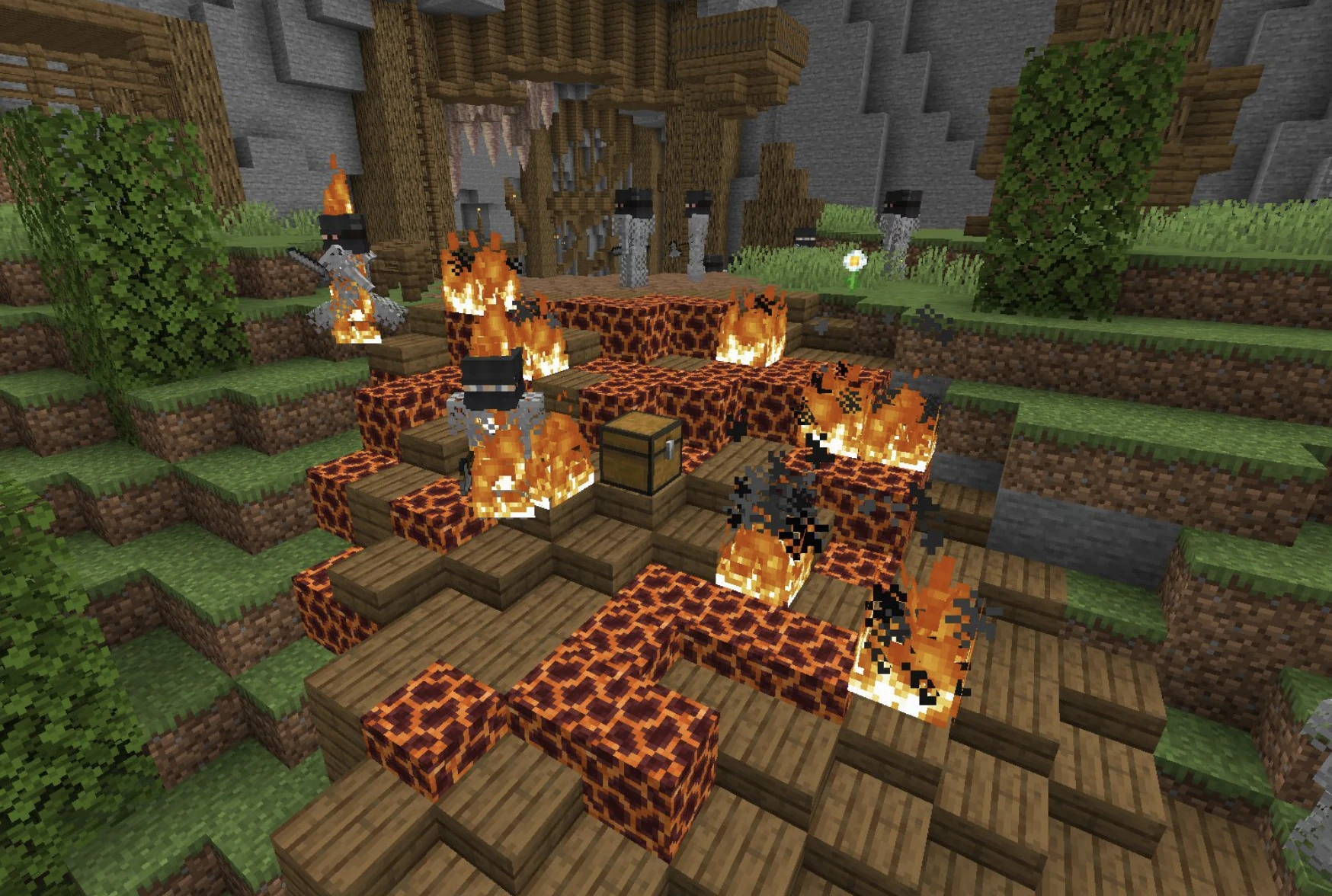
This project is a game, built on Minecraft, focused on a type of game called Skyblock. It has a lot of qualities of an RPG but overall would be classified as a Skyblock server.
The server turned into a profitable business that has supported me through university, and allowed me to get an apartment in Toronto.
While I cannot share any code as the server is not open-source, I have written this detailed outline with code snippets. You can view gameplay on Youtube by searching "Midnightsky MC", here is one for convenience: https://www.youtube.com/watch?v=Ruial5IPnh8.
As you can see, I've spent many many hours working on this.
1.1 What is MidnightSky?
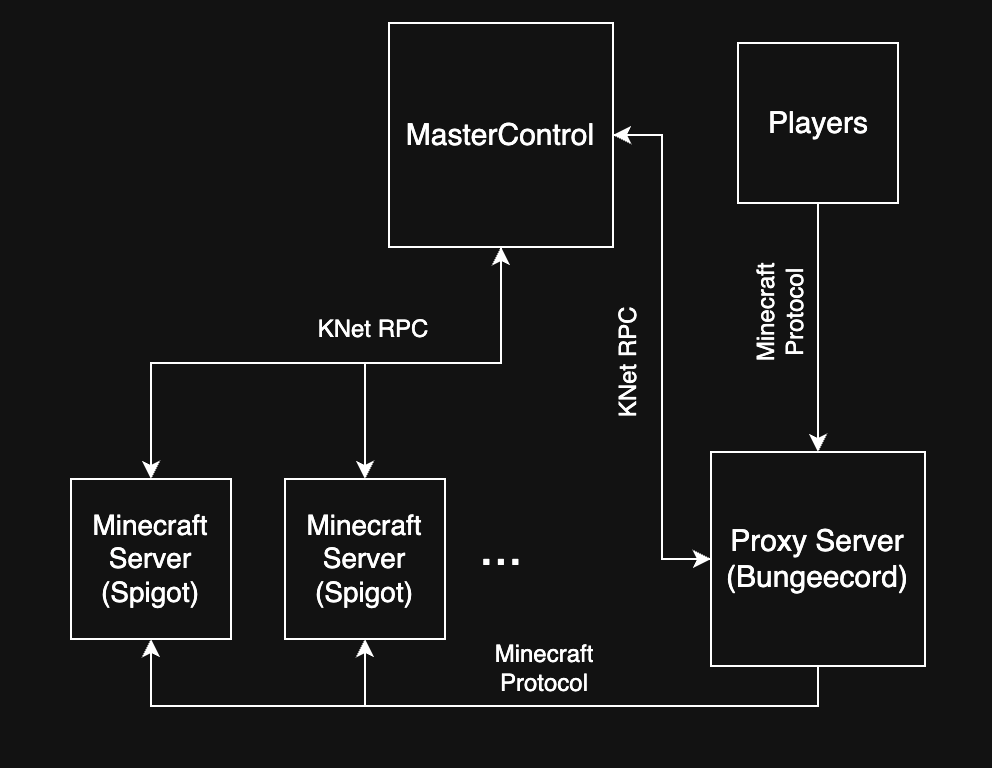
A horizontally-scalable Minecraft network where:
- Dozens of Game servers all act as one.
- A microservice-based MasterControl server orchestrates dozens of Game servers
- A lightweight Proxy plugin (BungeeCord) manages authentication & routing of players.
- All communication uses a custom, Netty-based binary RPC layer (KNet) with code-generated stubs.
1.2 Network Architecture
Why so many custom libraries
Throughout MidnightSky there are a few things that are non-standard custom libraries, with KNet being the most notable. If I was to remake MidnightSky perhaps I would use more standard libraries like Spring Boot, PL4J, or gRPC, but I found that it was an invaluable learning experience to write things myself and learn how everything works.
The KNet project was designed specifically for MidnightSky and provides an extremely simple-to-use interface. All that is needed is to write one interface defining the API methods, add one annotation, implement the interface and boom, ready to use. Binary RPC was chosen over REST APIs for performance as HTTP in comparison is quite slow for the real-time constraints MidnightSky admits.
1.2 Features
I've built hundreds of features for MidnightSky over the years. The vast majority of features are concentrated in both the Adventure and Island systems, which are mentioned here first in this high-level list of features.
- Durable Island System with fast load/save times and dozens of sub-features like island bots, mining nodes, custom farming, custom fishing mechanics and animations, sophisticated loot mechanics, various island upgrades, expansion islands, automation primitives, etc.
- Multiple Adventure Maps complete with bosses, 6 tiers of enemies, POIs, loot mechanics, a levelling system, enemy ability and animation system, etc.
- Social systems such as Auction House, Direct Messaging, Public Island warps, Chat systems for displaying your loot and inventory, and Alliances (which has many systems of its own like taxes on members).
- Periodic Games and Events like Crates, Black market auction, Contests, Jackpot (Lottery), Alliance Wars (a complex bracketed game of its own), King of the Hill, and Last Man Standing.
- Secure trading systems like /trade (command), chance-based trading with /coinflip, and combat-based trading and wagering with /duel.
- Over 500 unique items and loot drops each with its own role and functionality.
- Onboarding systems like /challenges and /help.
- Dozens of administrative and moderation tools including a network log system featuring 30 different types of player logs, dozens more system logs, and AI chat moderation.
- Complex Stat and Effect system with over 100 different types of effects and 12 different stats that affect combat and more.
- A punishment system
- 20 Different Player Leaderboards in areas like Most Enemies Killed, etc.
- Server configuration system similar to Git, complete with configuration commits, change history, rollbacks, and instant cross-server config hot-reloads when changes are pushed.
- Levelcap – a Progressional and Economic Limiter/Barrier to keep all players within a certain progressional range at each point during a season. This also doubles as a scheduling mechanism for updating certain configs on certain dates during the season.
- 350+ unique in-game GUIs to facilitate easy use of almost all features.
- 550+ unique in-game commands to facilitate quick usage of all features.
- Custom developed Command and GUI frameworks for each of the above (MidnightCommands and FluidGUI)
1.3 Coroutine Usage
I utilize coroutines extensively in this project, I've absolutely fallen in love with them. The most useful applications of them in this project include the following
TickDispatcher
The tick dispatcher is a coroutine dispatcher on Game Servers that runs coroutines on the main Server Thread. Spigot (server plugin framework) has it's own scheduler that allows you to schedule tasks, but this greatly simplifies scheduling tasks. For example, in an animation, using scheduling I would need to write code centered around a tick counter and have different parts execute depending on the "time" in ticks since the animation began. Code would look like this:
    public void update(Player target) {

        if (ended) return;

        if (phase == 0) {
            // ...
            for (int i = 0, standListSize = standList.size(); i < standListSize; i++) {
                EntityRef<ArmorStand> ref = standList.get(i);
                ArmorStand stand = ref.get();
                if (stand != null) {

                    Location loc = location.clone().add(Math.cos(i * rotationAmount) * currRadius, relY, Math.sin(i * rotationAmount) * currRadius);
                    loc.setYaw((float) (relY * 180));

                    setEntityLocation(stand, loc.getX(), loc.getY(), loc.getZ(), loc.getYaw(), loc.getPitch());
                }
            }
        } else if (phase == 1) {
            int phaseTick = tick - phase0Ticks;

            // ...

            Location destination = target.getLocation().add(0.5, 0, 0.5);

            for (int i = 0, standListSize = standList.size(); i < standListSize; i++) {
                EntityRef<ArmorStand> ref = standList.get(i);
                ArmorStand stand = ref.get();
                if (stand == null) continue;

                // ...

                setEntityLocation(stand, toTeleport.getX(), toTeleport.getY(), toTeleport.getZ(), toTeleport.getYaw(), toTeleport.getPitch());

                if (percent >= 1) {
                    stand.remove();
                    target.damage(0.01);
                }
            }
        }

        if (++tick >= animTicks) {
            stop();
        }

        if (tick >= phase0Ticks) {
            phase = 1;
        }
    }
But with coroutines, I can write code that looks much cleaner:
suspend fun play(config: AirdropConfig, location: Location) {
        fall(location)
        spawnChest(config, location)
        val backBlocks = explosion(location)

        delayTicks(30 * 20)

        location.block.fakeBreak()
        location.block.type = Material.AIR

        backBlocks.forEach { (offset, type) ->
            location.block.getRelative(offset.x, offset.y, offset.z).type = type
        }
    }
Notice the delayTicks() function which suspends the coroutine for 30 seconds before proceeding, but without blocking the main Server Thread. Also notice that fall() can be suspending and implement its own completely separate animation that can be chained onto the beginning of this larger Airdrop animation.
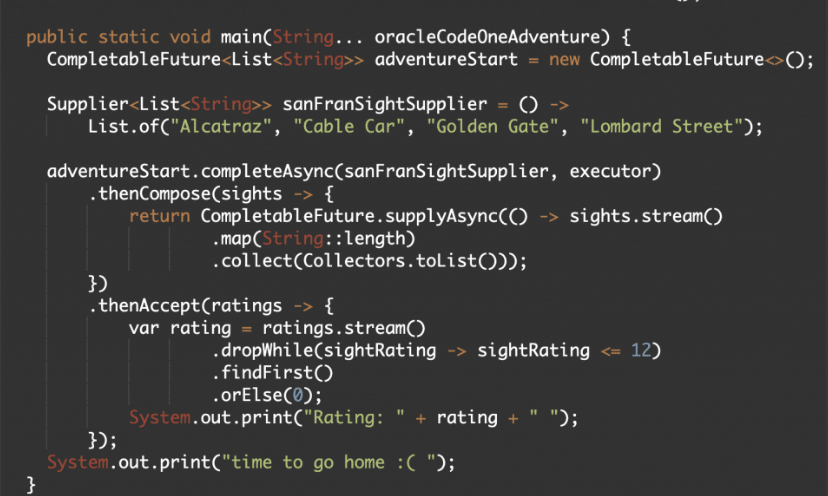
Replacement for CompletableFuture Many Java developers will recognize "Callback Hell", and in the past, many parts of MidnightSky fell victim to it. Coroutines allow me to replace 50 chained completable future calls with simple suspending function calls that are as easy to read as synchronous code. I don't actually have an example of what it looked like before, because I have rewritten all instances of it to use coroutines, but here is an image from google that is similar.
4. Custom Libraries
4.1 KNet
Collaboration with Magnus Petz (https://github.com/MrMineO5)
- API Definition
Create an interface that will outline each of the procedure calls in the common module. In this interface, you will define one suspending function for each api call you want to add to the protocol. You must also add the @ProxiedInterface annotation that will generate supporting code. One example is shown below, function descriptions have been removed for brevity.
@ProxiedInterface
interface MasterIslandService {

    suspend fun register()
    suspend fun listIslands(): Set<SUUID>
    suspend fun listRegistrations(): Map<String, List<SUUID>>
    suspend fun save(island: UUID, save: Pair<SJsonMeta, ByteArray?>, sessionId: Long? = null): Boolean
    suspend fun deleteIsland(island: UUID)
    suspend fun triggerUnload(island: UUID): Boolean
    suspend fun sendToIsland(checkAccess: Boolean, player: UUID, island: UUID, location: IslandLocation?)
    suspend fun moveIsland(island: UUID, server: String?)
    suspend fun leaderboard(rank: Int, num: Int): List<IslandLeaderboardEntry>
    // ... Omitted for brevity
}
- Implementation and Registration
Once you have implemented your interface in the MasterControl project, you must register it by making this call:
registerNewProxy(MasterIslandManager)
- Usage
Now, you can use this service from the Spigot project like this:
val proxy = getProxy<MasterIslandService>()
proxy.sendToIsland(!force, playerId, target.id, null)
Just make sure to handle any exceptions that might be thrown as uncaught exceptions thrown on the side of MasterControl are propagated to the caller on the Spigot server (or vice versa if MasterControl is the caller).
Limitations
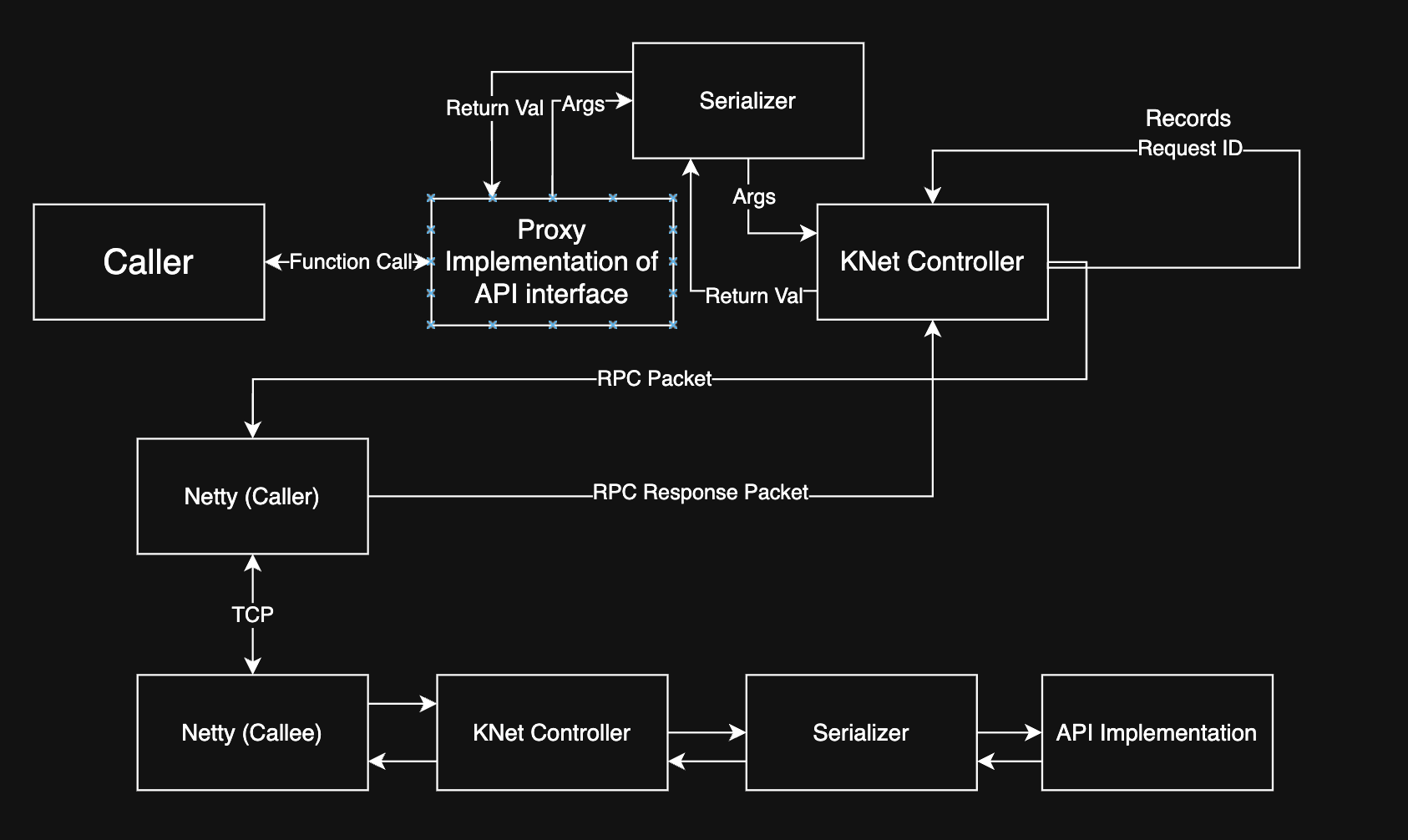
Only primitives, classes marked with@Serializable(Kotlinx), andGravSerializable(Legacy System) classes can be used as parameter and return types in KNet APIs. However, some utility classes are fine by default such asUUID.Implementation Below is a sketch of the implementation architecture of KNet
4.2 MidnightCommands
There are over 500 commands on MidnightSky and so I made a library that makes it very easy to create new commands. Here's an example of what a command class looks like:
Command: /duel accept {id}
this command is never actually used by players but is used as a callback for a clickable chat message that says "Click to Accept"
object CmdDuelAccept : NewMidnightCommand("accept") {
    init {
        noPermission()
        params {
            integer("id")
        }

        executor {
            if (isServerFlag(ServerFlag.RESTRICTED_ITEM_ACCESS)) cmdError("You cannot do that here.")

            val id: Int = arg("id")
            val duel = getProxy<MasterDuelService>().get(id) ?: return@executor cmdError("Duel not found")
            GuiDuelAccept(duel).open(player)
        }
    }
}
As you can see, you need to extend NewMidnightCommand("alias") and pass in the main alias for the command in the constructor. In the init block, you build the command using a standard kotlin builder DSL. By default a command needs a certain permission to use, but you can disable that by calling noPermission(), then you can configure your parameters in the params {} block, and then finally define the executor, which executes the command on the main thread (by default) in a coroutine.
Here's one more example for you:
Command: /top reset {board}
this is an administrative command used to reset a leaderboard
object CmdTopReset : NewMidnightCommand("reset") {
    init {
        permission("midnight.top.reset")
        params {
            options("leaderboard") {
                getter { TopLeaderboardType.entries }
            }
        }

        executor {
            val service = getProxy<MasterLeaderboardService>()
            service.reset(arg("leaderboard"))
            respond("<a>Leaderboard reset.".toComp())
        }
    }
}
4.3 KAsyncWorld
Library for extremely fast world-editing and world-manipulation. Please see https://mattlack.com/project/1748545289816
4.4 KSerializer
This is just an expansion to Kotlinx Serialization that adds an encoding format that has a few features we need like binary types, nullability support, and importantly speed. the KJson encoding which KSerializer provides is much much faster than the default Json encoder that kotlinx provides out of the box. It also supports null unlike protobuf.
4.5 KComp
Minecraft now uses a certain component-based chat system, and making chat messages is a little more complicated than writing a string now. Strings, however, have great support in kotlin for interpolation, and we wanted that for Chat Components, so this project is a compiler plugin that allows safe component interpolation within strings. It's probably better if I just show an example. Consider this line of code:
ChatHandler.instance.send("<c>Profiler: <f>$clickMe".toComp(), visibility)
clickMe is a Component instance, so normally, this would call toString() on it and not at all give what I want, but KComp will instead insert the component into the larger message's component along with all colours, click events, hover events, etc.
4.6 FluidGUI
Like commands, MidnightSky has lots and lots of GUIs, over 300 of them and they are a pain in the butt to make using regular Spigot APIs. So, meet FluidGUI, a library allowing me to declaratively define GUIs and not have to worry about placing individual buttons in individual slots. The main time-saver of this library is the fact that it works like an html flex box – you just define the general layout and the gui places the components for you. Example:
class GuiExpansionBuffEditor(val config: ExpansionBuffConfig, val back: FluidGui) : FluidGui("Buff Editor".toComp(), 5) {
    init {

        background = fillerItem(Material.BLACK_STAINED_GLASS_PANE)

        container(width = 9, height = 1) {
            background = fillerItem(Material.BLACK_STAINED_GLASS_PANE)
            addComponent(backButton(back))
            flexLayout(justify = FlexLayout.Justify.CENTER)
        }

        field {
            label("<b>Growth Rate Boost".toComp())
            description("Percentage boost in crop growth rate")
            get { (config.growthBoost * 100.0).toString() }
            set { config.growthBoost = it.toDouble() / 100.0 }
        }

        field {
            label("<b>Spawn Rate Boost".toComp())
            description("Percentage boost in mob spawn rate")
            get { (config.spawnBoost * 100.0).toString() }
            set { config.spawnBoost = it.toDouble() / 100.0 }
        }

         // ...

        container(width = 9, height = 1) {
            dynamic {
                for (effect in config.effects) {
                    button {
                        renderer {
                            // ...
                        }
                        onClick {
                            if (it.isShiftClick) {
                                config.effects -= effect
                                update()
                            }
                        }
                    }
                }

                button {
                    renderer {
                        MidnightItemBuilder(Material.LIME_STAINED_GLASS_PANE)
                            .name("<a>Add Effect")
                            .addLore("<7>Click to add a new effect.".toComp())
                            .build()
                    }

                    onClick {
                        coroutineMain {
                            // ...
                        }
                    }
                }

            }

            flexLayout()
        }

        flexLayout(justify = FlexLayout.Justify.SPACE_EVENLY, align = FlexLayout.Justify.SPACE_EVENLY)
    }
}
5 MasterControl
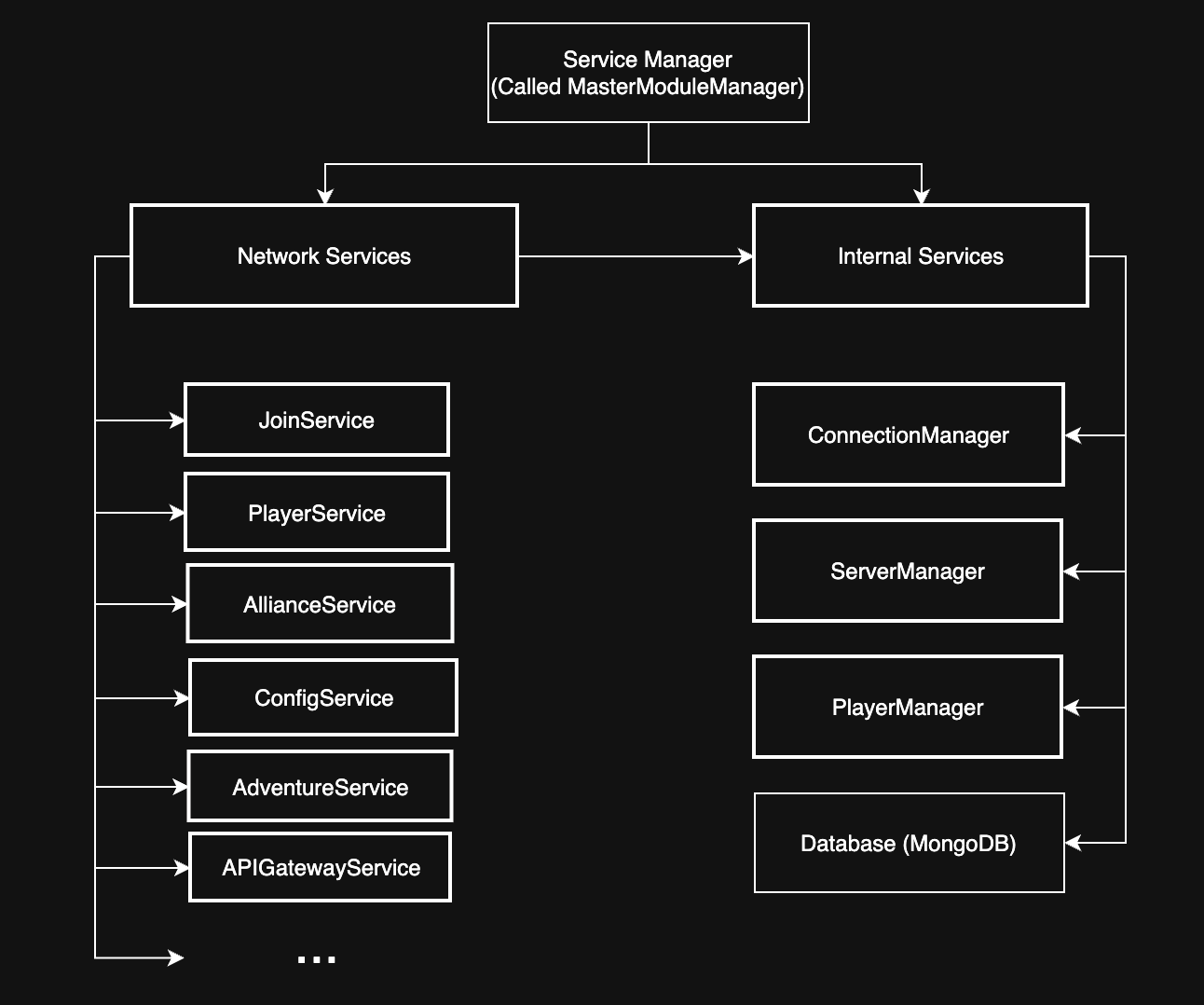
5.1 Architecture Overview
5.2 Services
Each master service is given a single-threaded Coroutine Scope for its tasks so that there isn't much headache worrying about thread-safety as each service is single-threaded and completely owns the resources it uses, furthermore context-switching is predictable and can only occur at suspension points. Inter-service calls are thread-safe as they switch to the thread of the called service for the call.
Services have database access through the MasterDatabase internal service and each service can define their own Database access interfaces, and a MongoDB implementation for clean separation.
Services can list individual Game servers (Spigot) by way of the internal ServerManager service, and make RPC calls to them.
On-shutdown, RPC calls are paused, and each service is allowed time to complete running calls before their coroutine scope is closed.
7. Core Gameplay Systems – Deep Dives
7.1 Islands
7.1.1 Island Loading
The island system is facilitated by MasterIslandService, which orchestrates and synchronizes the loading and saving of islands on different game servers. Once an Island Server starts up, it calls register() in the island service to notify MasterControl that it is ready to start serving players. A player will teleport to their island by running the /is go command. This command will call sendToIsland() on the island service which will then perform the following sequence of actions:
- Retrieve the island header and check island access permissions if applicable
- Find out if the requested island is already loaded and teleport the player there if so
- If not, pick the island server with the least current load*
- Fetch the island data and world from the database
- Generate a session ID for the island **
- Command the picked server to load the island, providing the data and world to it
- Once loaded, update data structures that keep track of island load states and locations
- Teleport the player to the island
* It actually picks a server using a probability distribution weighted by the inverse of each server's current load, this prevents a situation (which actually happened in production) where hundreds of islands could pick the same low-load server at the same time, instantly overloading it.
** Session IDs track each period of an island being loaded, if by some nightmare the same island is ever loaded on two different servers, then on the next save event (every minute) only the most recent session's data will be persisted and the out-of-date instance will be unloaded. Thankfully, this has never happened with this Island System (though it did happen with the previous system).
Parts this procedure are island-wise mutually exclusive, such as the island loading and data structure updating. This ensures consistency even under heavy load. Mutual Exclusivity is facilitated by the UUIDMutex class, which ensures that two coroutines with the same key (UUID) cannot enter certain critical sections at the same time by suspending all but one of the coroutines until the "holder" finishes. This is a custom class that had to be made because a normal lock would block the service's single thread.
On the Game Server's side, loading an island looks like this, after receiving the data (IslandData) and the world data (data structure containing PackedWorld instances from the KAsyncWorld project).
- Start timings (times each part of this)
- Figure out how many worlds the island has, decode each one
- Create Island Instance
- Create Island Worlds
- Set island status to FULL indicating it is fully loaded (as opposed to data-only, no worlds)
- Enable the island (starts island mechanics and loads data structures from IslandData)
- Record the island in a data structure
- Push the island header to the Island Service
7.1.2 Island Unloading
Once the last player leaves an island, the Island Server will wait a few seconds, and then issue a request to the Island Service to unload the now-empty island. Then, the IslandService issues the unload request back to the Island Server.
(This is to ensure a consistent order of execution, in particular it ensures that MasterIslandService always knows that an island is unloading before unloading actually begins, avoiding various race conditions. Generally I have found that having a uni-directional flow of control makes everything better)
The Island Server then unloads the island and sends the saved data back to the service for processing and persistence.
7.1.3 Data
Island Data culminates in the IslandData class which is supplied to the Island instance during loading. The Island instance has a number of modules for mechanics that either work directly on the IslandData object, or load into specialized data structures and then save back to it later. The aim is for most of the Island mechanics code to function on the IslandData, through trial and error this has proven to be the most organized way of structuring the many mechanics classes that Islands need.
7.1.4 Worlds
Islands can have multiple worlds, but have one main world. Each world is a KAsyncWorld in-memory world, which is desirable due to the volatility of these worlds. It would be inconvenient and slow to need to clean up file directories each time an island is loaded or unloaded. Worlds have extra data defining Island Structures, each of which has data, a handler instance (one per type), dimensions and a position. Examples of these structures include:
- Island Portals
- Deadzone portals
- Spawners
- Mining Nodes
- Permission Blocks
- Power Adapters
- Dimensional Chests
- Conduit
- Deadzone Workbench
There is a class called IslandEnvironment which holds pretty much all the extra information you would need about an IslandWorld that is separate from its block content. To be specific, it contains:
    val collectionChestManager = IslandCollectionChestManager(this)
    val botManager = IslandBotManager(this)
    val realmPortalTracker = IslandRealmPortalTracker(this)
    val structures = IslandStructureTracker(this)
    val naturalGrowthTracker: IslandNaturalGrowthTracker = IslandNaturalGrowthTracker(this)
    val mobHandler = IslandMobHandler(this)
    val fishTracker = FishTracker(this)
There are also many EnvironmentHandler classes, all singleton, that handle all the world mechanics of every island on the server. Here is an example, a lot is omitted as these handlers do a lot of... pizazz (animation):
class IslandFishingHandler : EnvironmentHandler() {
    @EventSubscription
    private fun onFish(ev: PlayerFishEvent) {
        val hand = ev.player.inventory.itemInMainHand.toMidnight() ?: run {
            // ...
            return
        }
        // ... Much omitted

        if (ev.state == PlayerFishEvent.State.CAUGHT_FISH) {

            val loc = ev.hook.location

            val islandWorld = ev.player.serverPlayer.currentIslandWorld ?: return

            val sp = ev.player.serverPlayer

            val availableTypes = // ...

            if (availableTypes.isEmpty()) return

            val fishLuck = ev.player.serverPlayer.getEffects(Effects.FISH_LUCK)
                .sumOf { it.arguments[0].toDouble() }

            // ... Much is omitted

            val rodXP = FishingProgression.settings[type]!!.rodXP

            val fishingEvent = //...

            Bukkit.getPluginManager().callEvent(fishingEvent)

            if (fishingEvent.isCancelled) return

            // ... Much is omitted

            // Launch fish
            val fishTracker = islandWorld.environment.fishTracker

            val tempGroup = FishGroup(FishArea(), 20 * 6)
            fishTracker.addGroup(tempGroup)

            val fish = Fish(tempGroup, ev.hook.location, type)
            fish.caughtBy = ev.player.uniqueId

            tempGroup.addFish(fish)

            fish.drops = fishingEvent.drops.mapNotNull { it.get() }.toMutableList()

            val distanceToFisher = fish.location.distance(ev.player.location).coerceAtLeast(0.01)
            val flightTime = (distanceToFisher.pow(0.2) * 20 * 0.6).coerceAtLeast(0.01)

            fish.noAITicks = 20
            fish.launch(ev.player.location, flightTime)
        }
    }
}
Admittedly, some of these handlers can get quite messy and this is one of the areas of MidnightSky that I'd like to improve on during one of my future refactoring sessions.
7.2 Alliances
Overview
Alliances give players a way to make organized groups. An alliance is a group of up to 15 players that usually all play on a single island. The alliance must have one Leader and everyone else can have one of a few different roles like Officer or even just Member.
Each server must keep a cached copy of the alliance of each player currently on that server, it is uncached when there are no remaining players of that alliance on that server. The copies must be kept because there are lots of game mechanics that rely on being able to query alliance information without block or delay. However, the copies are read-only and any changes must be made via the Alliance Service, which has the following outline functions:
@ProxiedInterface
interface MasterAllianceService {
    suspend fun searchByName(name: String): List<ByteArray> // TODO fix this this is ugly
    suspend fun searchByMemberName(name: String): List<ByteArray>
    suspend fun byId(id: UUID): AllianceData?
    suspend fun byName(name: String): AllianceData?
    suspend fun byMember(id: UUID): AllianceData?
    suspend fun track(id: UUID): AllianceData?
    suspend fun untrack(id: UUID)
    suspend fun create(name: String, leader: UUID): Result<AllianceData?>
    suspend fun disband(allianceId: UUID): Result<Boolean>
    suspend fun join(allianceId: UUID, playerId: UUID): Result<Boolean>
    suspend fun leave(allianceId: UUID?, playerId: UUID): Result<Boolean>
    suspend fun setRole(allianceId: UUID, playerId: UUID, role: AllianceRole): Boolean
    suspend fun setRelation(first: UUID, second: UUID, relation: AllianceRelation): Boolean
    suspend fun addInvite(allianceId: UUID, invite: AllianceInvitation): Boolean
    suspend fun useInvite(allianceId: UUID, playerId: UUID): Result<Boolean>
    suspend fun cancelSubscription(...): Result<Boolean>
    suspend fun buySubscription(...): Result<Boolean>
    suspend fun renew(...)
    suspend fun updateSubscription(...): Boolean
    suspend fun setTax(allianceId: UUID, type: AllianceTaxType, tax: Double)
}
As you may have noticed, I seem to have also copied in a TODO that I never did. This service is on my list for refactoring as while its implementation is not terrible and really I've never had any problems with it, its a bit messy. As an example, you can see here:
    override suspend fun searchByMemberName(name: String): List<ByteArray> {
        val possiblePlayers = PlayerCache.getIdToName().values.filter { it.lowercase().startsWith(name.lowercase()) }
            .mapNotNull { PlayerCache.getId(it) }
            .toSet()

        return tracker.all().values.filter { alliance ->
            alliance.state.memberships.any { it.key in possiblePlayers }
        }.map { it.state }
            .map { it.serialize().toByteArray() }
    }
that it still uses an old serialization system and so can't be sent over KNet, so needs to be changed to a List of ByteArrays. I'd like to migrate this to Kotlinx Serialization at some point when I get time.
7.3 Stats and Effects
I designed a unified Stat & Effect framework to power combat modifiers, loot chances, mob behaviors, and a host of gameplay mechanics. Unlike one-off event listeners, this system lets me declare Effects in a consistent Kotlin DSL with typed parameters, semantic stacking rules, and event-driven triggers.
Defining Effects
Effects subclass Effect, specify an identifier, human-readable name, description, and typed parameters:
class EffectPvpDefense : Effect("pvp_defense") {
    init {
        description("Reduces incoming PvP damage by a percentage.")
        params {
            double("percent") {
                description("Damage reduction percentage")
                default(0.0)
                tags(EffectParamTag.ADDITIVE)
            }
        }
    }

    @EventSubscription
    private fun onDamage(event: StattedDamageEvent) {
        val player = event.victim as? ServerPlayer ?: return
        val reduction = player.getEffects(this).sumOf { it.arg<Double>("percent") }
        if (reduction <= 0.0) return
        event.multiplyBase(event.damageStat, -reduction / 100.0)
        procMessage(player)
    }
}
Parameters & Stacking
Typed parameters (integer, double, boolean, string, etc.) are declared in a params block. Defaults, descriptions, and semantic tags (EffectParamTag.ADDITIVE, EffectParamTag.MULTIPLICATIVE, etc.) drive stacking logic and help generate in-game tooltips.
Event-Driven Triggers
The @EventSubscription annotation hooks effects into any Spigot or custom event. Inside those handlers, I query active Effects on a player or entity (getEffects(this)), aggregate parameters, and apply custom logic (damage modification, healing, loot manipulation, etc.).
Centralized Registration
All effects register themselves in Effects.kt, making it trivial to browse the full catalog:
object Effects {
    val PVP_DEFENSE        = EffectPvpDefense().register()
    val ADV_MOB_EFFICIENCY = EffectAdvMobEfficiency().register()
    // ...100+ other effects...
}
Legacy Migration
This DSL replaces our older AbstractEffectHandler API that relied on manual event wiring and untyped argument arrays. The new approach eliminates boilerplate, enforces type-safety, and standardizes behavior across a hundred distinct effects.
This unified framework has drastically reduced boilerplate, improved readability, and made balancing game mechanics both faster and safer.
7.4 Stat Effects & Effect Providers
While core attributes such as Health, Damage, Strength, and more all follow the same Effect‑based paradigm (via the StatEffect helper and StatEffectHandler), their values are ultimately sourced from a collection of modular EffectProviders. Stats themselves are registered alongside other Effects in Effects.kt:
// Stats are implemented as StatEffects with an operation and amount.
val STAT_STRENGTH     = StatEffect("stat_strength",         "Strength").register()
val STAT_ATTACK_SPEED = StatEffect("stat_attack_speed",     "Attack Speed").register()
val STAT_DAMAGE       = StatEffect("stat_damage",           "Damage").register()
val STAT_HEALTH       = StatEffect("stat_health",           "Health").register()
val STAT_MEND         = StatEffect("stat_mend",             "Mend").register()
// …other stats…
val STATS = listOf(
    STAT_STRENGTH,
    STAT_ATTACK_SPEED,
    STAT_DAMAGE,
    STAT_HEALTH,
    STAT_MEND,
    // …etc…
)
At runtime, StatEffectHandler.getValue(effect, player) collects all active stat_* effects for the player, applies ADD/MULTIPLY_BASE/MULTIPLY operations in the proper sequence, and returns a ModifiedStat representing the final computed value. This ensures a consistent, extensible pipeline for all attribute‑based calculations.
Effect Providers
An EffectProvider is any pluggable data source that can supply ActiveEffect instances from arbitrary gameplay contexts—gear, consumables, skill trees, pets, temporary buffs, and more. Providers are registered on module startup via the central PROVIDER_REGISTRY:
// ModuleEffects.java (onEnable)
AbstractEffectHandler.PROVIDER_REGISTRY.register("base_stats",     new BaseStatsProvider());
AbstractEffectHandler.PROVIDER_REGISTRY.register("items",          new MidnightItemEffectProvider());
AbstractEffectHandler.PROVIDER_REGISTRY.register("timed_effects",  TimedEffectProvider.INSTANCE);
AbstractEffectHandler.PROVIDER_REGISTRY.register("effect_package", PermissibleEffectHandler.INSTANCE);
Some providers include:
- BaseStatsProvider: supplies baseline stat effects (default Health, Damage, Mend, Attack Speed).
- MidnightItemEffectProvider: scans the player’s equipped armor and held items for custom
IPlayerEffectable/IEffectablemetadata and injects any Effects declared on those items. - TimedEffectProvider: manages temporary, duration‑based effects (buffs, debuffs, cooldowns).
- PermissibleEffectHandler: hooks in permission‑based Effect packages for group or permission‑driven effect sets.
Additional providers are registered by other modules (adventure skills, island expansions, mob profiles, etc.), all leveraging the same registry. When resolving active effects for a player, the system queries every registered provider, merges their outputs, and caches the result for high‑performance lookups in both stat calculations and event‑driven triggers.
7.5 Player Data
MidnightSky has dozens of game servers, and players are constantly moving between them. Teleporting to an island, an adventure map, or back to the hub means switching servers. Each player also has a large amount of data (inventory, island progress, adventure progress, cosmetics, cooldowns, etc.) that needs to follow them from server to server.
Now the hard part. Only one server can be writing to a player's data at a time. If two servers both think they own the data, the one that saves last overwrites the other's changes. Or worse, the player ends up keeping their items on both servers. In a game with a player-driven economy, this is exactly how item dupes happen.
The data
A player's data lives in one @Serializable class, which is stored as a single document in MongoDB:
@Serializable
data class NewPlayerData(
    @SerialName("_id") val id: SUUID,
    val chat: ChatPlayerData = ChatPlayerData(),
    val cosmetic: CosmeticData = CosmeticData(),
    val alliance: AlliancePlayerData = AlliancePlayerData(),
    val island: IslandPlayerData = IslandPlayerData(),
    val adventure: AdventurePlayerData = AdventurePlayerData(),
    val mastery: MasteriesPlayerData = MasteriesPlayerData(),
    val vaults: VaultPlayerData = VaultPlayerData(),
    val challenges: MutableMap<String, ChallengeData> = mutableMapOf(),
    val joinInstructions: MutableList<PlayerJoinInstruction> = mutableListOf(),
    val cooldowns: MutableMap<String, Long> = mutableMapOf(),
    // ... about 25 more
)
(Yes, it is called NewPlayerData, there used to be an old one.)
Holds
Ownership is handled with what I call holds, which are basically leases. Next to the player's data there is a tiny second document:
@Serializable
data class PlayerLifecycle(
    @SerialName("_id") val id: SUUID,
    val hold: PlayerHold? = null,
    val version: Long = 0
)

@Serializable
data class PlayerHold(val owner: String, val type: HoldType, val timestamp: Long = System.currentTimeMillis())
A server has to acquire the hold before it is allowed to touch the player's data. The hold expires after 30 seconds unless the owner renews it, and the owner renews it every 3 seconds while the player is online. So what happens if a game server crashes or freezes while holding a player? Its holds just quietly expire, and the player can join a different server (without anyone needing to clean anything up by hand).
I update the lifecycle document with a compare-and-set on the version number. The service reads the document and works out what the new one should be. It then only writes it back if the version has not changed in the meantime, otherwise it tries again:
while (true) {
    val lifecycle = lifecycleRepo.get(id)
    val version = lifecycle.version
    val new = try {
        scope.block(lifecycle).copy(version = version + 1)
    } catch (e: Exception) {
        if (e != UPDATE_RETRY) throw e
        continue
    }
    if (lifecycleRepo.compareAndSet(new, version)) return null
}
compareAndSet() is just a replaceOne() that filters on both the _id and the expected version, so MongoDB does the hard part for me. Acquiring a hold is built on top of this. As long as someone else has a valid hold, it waits 50ms and tries again, until it times out:
override suspend fun acquire(id: UUID, options: AcquireOptions): NewPlayerData {
    val start = now()
    val res = updateLifecycle(id) {
        val hold = it.hold
        if (hold != null && hold.valid && hold.owner != options.owner) {
            if (now() - start >= options.timeoutMillis) cancel(Unit)
            delay(50)
            retry()
        }
        it.copy(hold = PlayerHold(options.owner, options.holdType))
    }
    if (res != null) throw TimeoutException()
    return dataRepo.getPlayerData(id) ?: NewPlayerData(id)
}
Switching servers
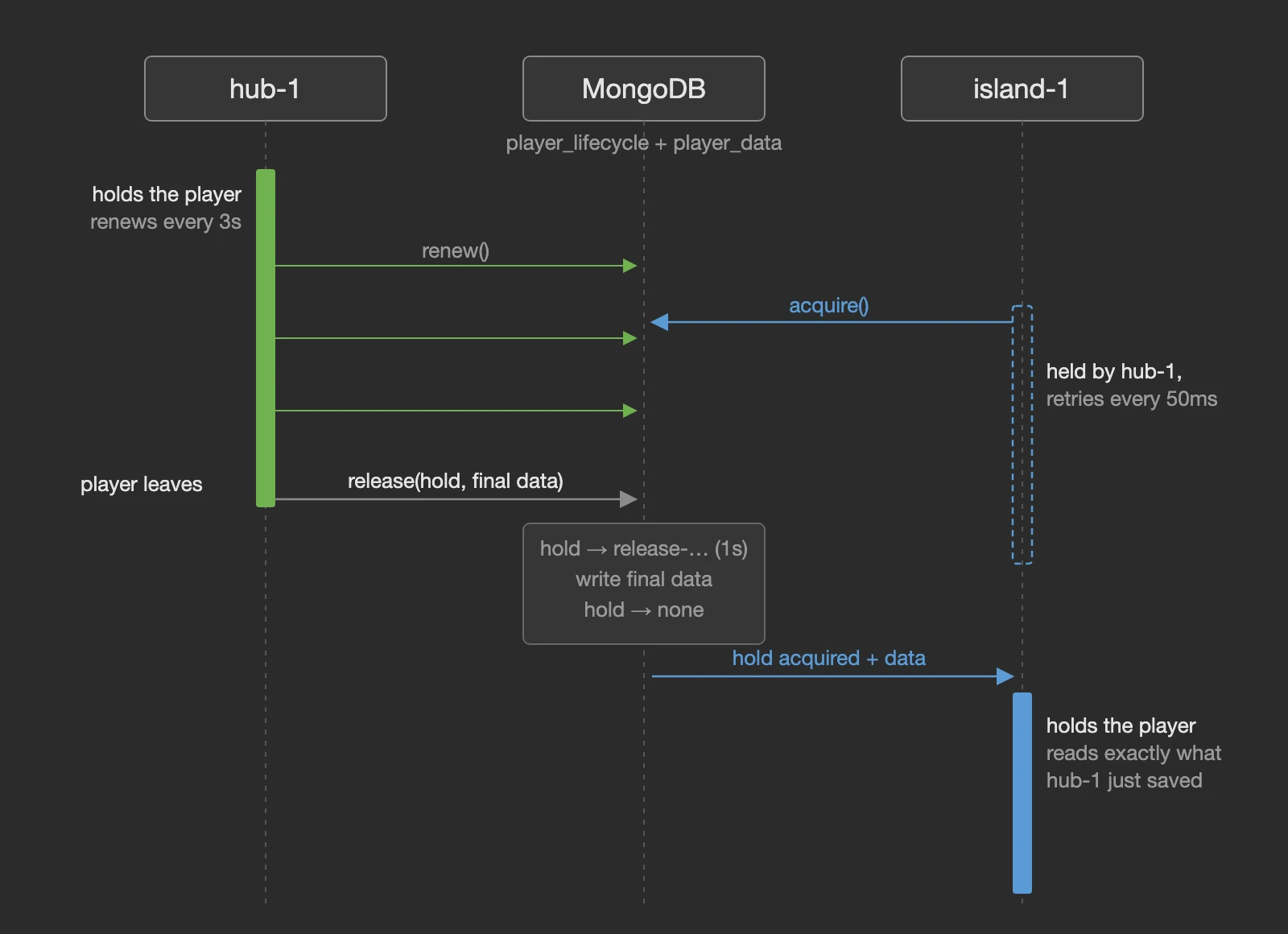
This is what happens when a player moves from one server to another:
- The old server releases its hold and sends the final copy of the data in the same call
- MasterControl swaps the hold for a short-lived internal one
- MasterControl writes the data, then clears the hold
- The new server, which has been waiting in its acquire loop, gets the hold
- The new server reads the data that was just saved
The second step is a little sneaky. It is there because otherwise another server could grab the player halfway through the save.
While the player is online, their data is also saved once a minute with updateIfHeld(), which (as the name suggests) only writes if the server still owns the hold. In the case that a server loses its hold (for example by freezing for more than 30 seconds), the player is kicked with "Data lock lost!" instead of letting two servers write at once.
Offline players
Since holds are not tied to a player being online, staff tools and game mechanics can use them to safely edit the data of offline players too. Here are two examples:
/invseeon an offline player acquires their data with a hold namedadmin/inv-see, lets the staff member edit the stored inventory in a GUI, and releases it when the GUI closes. A player trying to log in during this gets "Cannot join right now! Try again later. (held by admin/inv-see)".- Players who log out in the middle of a fight on an adventure map leave a combat logger behind in their place. The server acquires the (now offline) player's data if the logger is killed, removes the items from their inventory, drops them on the ground, and then releases the hold.
Join instructions
There are lots of features that need something to happen to a player once they arrive on another server, like cross-server /tp, accepting a duel, or joining a realm. These are stored as a list of PlayerJoinInstructions inside the player's data. The current server adds the instruction and sends the player off, then the destination server runs the instructions once the player has finished joining. Because the instructions are part of the player's data, they follow the hold around for free.
History
The first version of this kept the locks in MasterControl's memory and was written with chained CompletableFutures. Here's a small piece of it:
return@enqueue load().thenAccept {
    val future = synchronized(lock) {
        val head = pending.poll() ?: return@thenAccept
        holder = head
        head.future
    }
    future.complete(true)
}.thenRun {
    // In case the pending request was cancelled
    unloadScheduler(this)
}
It worked. However, MasterControl was the only thing that knew which server owned which player, and that made restarting MasterControl with players online a lot scarier than it should have been. In April 2025 I rewrote it so the hold state lives in the database, and it ended up much smaller and easier to reason about.
8. Administration & Moderation
Running a network like this is maybe half building features and half dealing with people trying to break them. Players find dupes, macro repetitive tasks, and type things in chat that should not be there. These are the systems I built to deal with that, plus the config system (which is how we change the game without restarting anything).
8.1 Network Logs
Logs are the first thing we reach for when something goes wrong, like "I lost my sword", "someone stole from my chest", or "this guy has 40 of an item that should be unique". For this reason we log pretty much anything to do with items moving around, as well as chat, commands, trades, deaths, joins, server health, and more. There are about 30 types right now:
enum class LogEntryType(val dataParser: (JsonObject, List<LogAttachment>) -> LogEntryData) {
    CRATE_OPEN(LogDataCrateOpen::parse),
    EQUIP_CHANGE(LogDataEquipChange::parse),
    CHEST_INTERACT(LogDataChestInteract::parse),
    MOB_DROP(LogDataMobDrop::parse),
    PICKUP_ITEM(LogDataPickupItem::parse),
    DROP_ITEM(LogDataDropItem::parse),
    CHAT(LogDataChat::parse),
    PRIVATE_MESSAGE(LogDataPrivateMessage::parse),
    TRADE(LogDataTrade::parse),
    SERVER_HEALTH(LogDataServerHealth::parse),
    // ... about 20 more
}
The entries share the same envelope, so they can be indexed and searched the same way regardless of their type:
@Serializable
data class LogEntry(
    val time: Long,
    val server: String,
    val type: LogEntryType,
    val level: LogLevel,
    val player: SUUID?,
    val location: LogLocation?,
    val attachments: List<Long>,
    val additional: JsonObject,
)
Attachments
Most logs involve an item, and items are big (enchants, gems, stats, lore, etc.). The same item is logged over and over as it gets picked up, dropped, put in a chest, equipped, traded, and so on. Instead of storing the item in each entry, I store items as attachments keyed by a hash of their contents, and the entry only keeps the hashes.
Sending a log is a little handshake. First, the game server sends just the entry. MasterControl stores it and replies with the hashes it has not seen before, and then the game server sends only those attachments:
val missingAttachments = service.log(entry)
val missingAttachmentsData = serialized.second.filter { missingAttachments.contains(it.hash) }
service.submitAttachments(missingAttachmentsData)
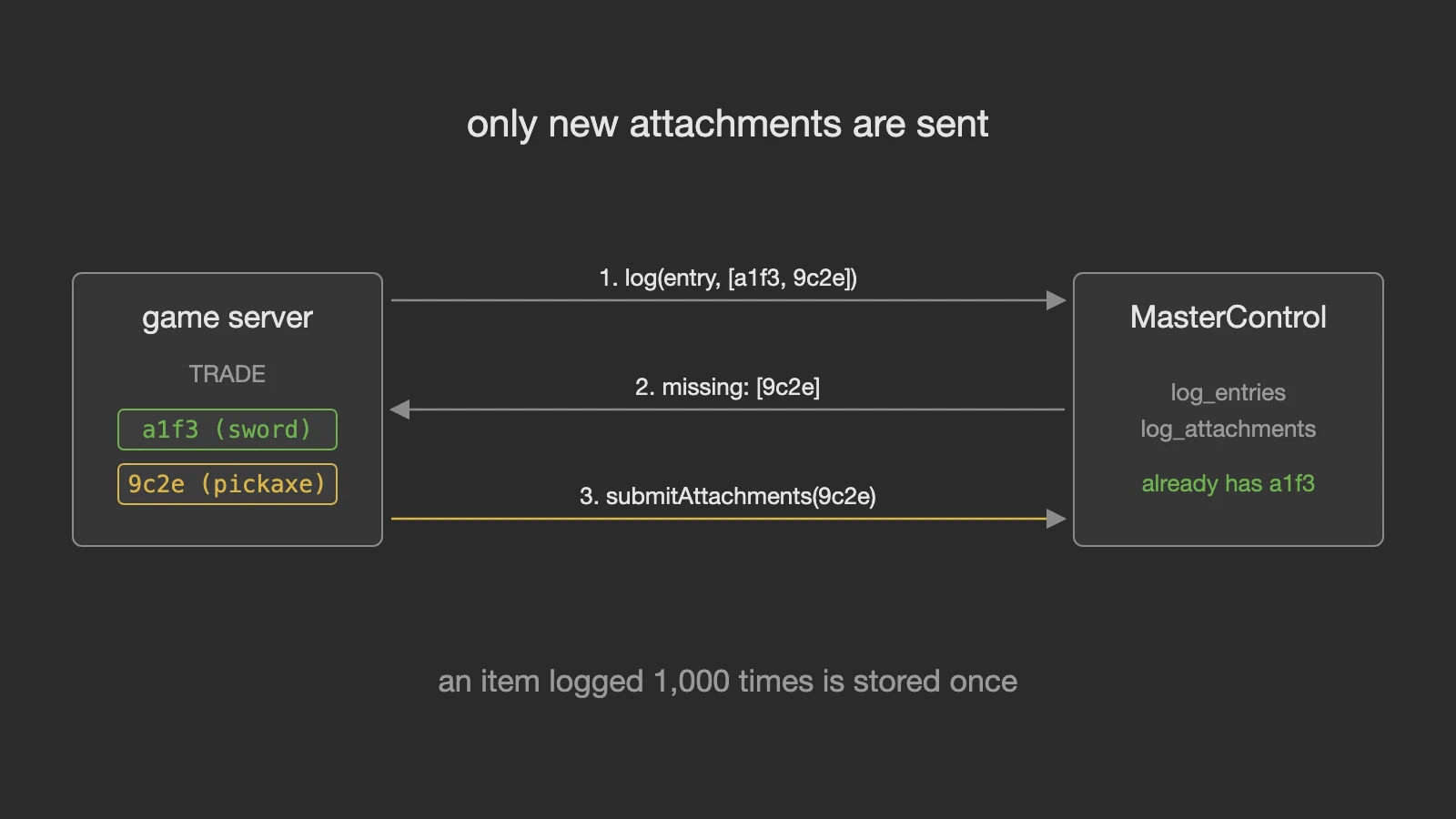
This way an item that gets logged a thousand times is only sent and stored once.
Locations
The location of a log is a place (an island ID or adventure map name) plus a block position. I pack the position into a single Long with 26 bits for x, 26 bits for z, and 12 bits for y (all signed).
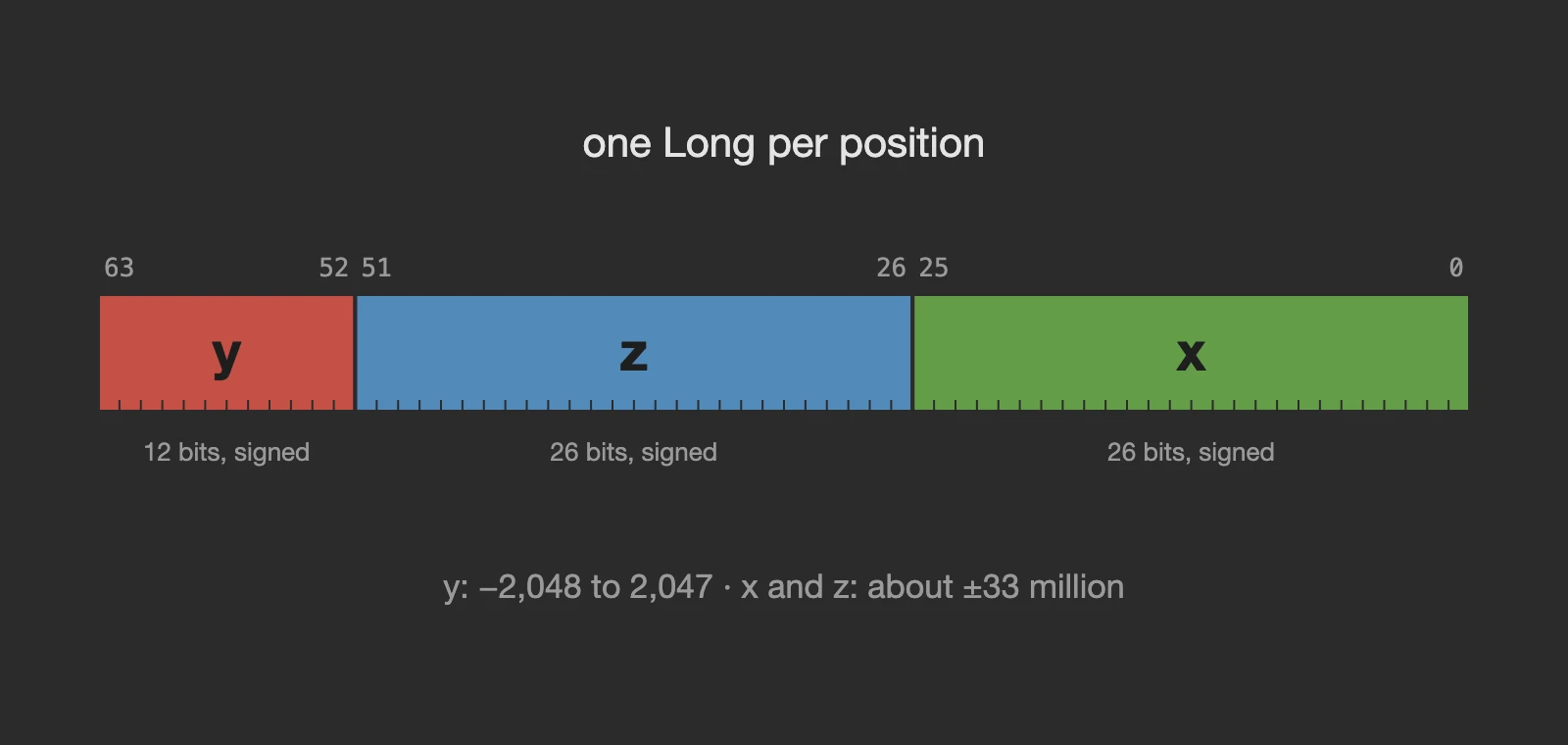
This turns "what happened at this chest" into a single indexed equality check on one field, rather than three range queries.
Using them
Staff search logs in-game with /logs <type> <duration> ... and the results open in a GUI. For example, looking at a chest and running /logs chest 3d shows who took items out of it or put items into it over the last 3 days.
My favourite one is /logs all 7d item=<id>. Unique items carry their own ID, so this command finds the attachments containing that ID, and then the log entries that reference those attachments. It basically traces the item through the hands of each player that has held it. This is usually how we figure out where a dupe started.
Server health
Game servers also log a health entry once a minute (TPS, ping to MasterControl, memory, and CPU). Servers with a TPS below 16 automatically start a spark profile and post the link in staff chat (this is the Profiler: $clickMe message from the KComp example earlier). There is also a small watchdog thread that dumps the stack trace of each thread to a file if the main thread has not ticked in 4 seconds. This is quite handy because when the server is frozen you can't exactly run commands on it.
8.2 The Config System
Pretty much every number in the game is configurable, like drop chances, mob stats, shop prices, island upgrade costs, etc. Most of it is edited in-game through GUIs (like the FluidGUI buff editor above) by me or other staff. This raises a few problems:
- An edit made on one server has to reach the other servers
- We need to know who changed what, and when
- We need to be able to undo a bad change quickly
- We want to try out changes without touching the live game
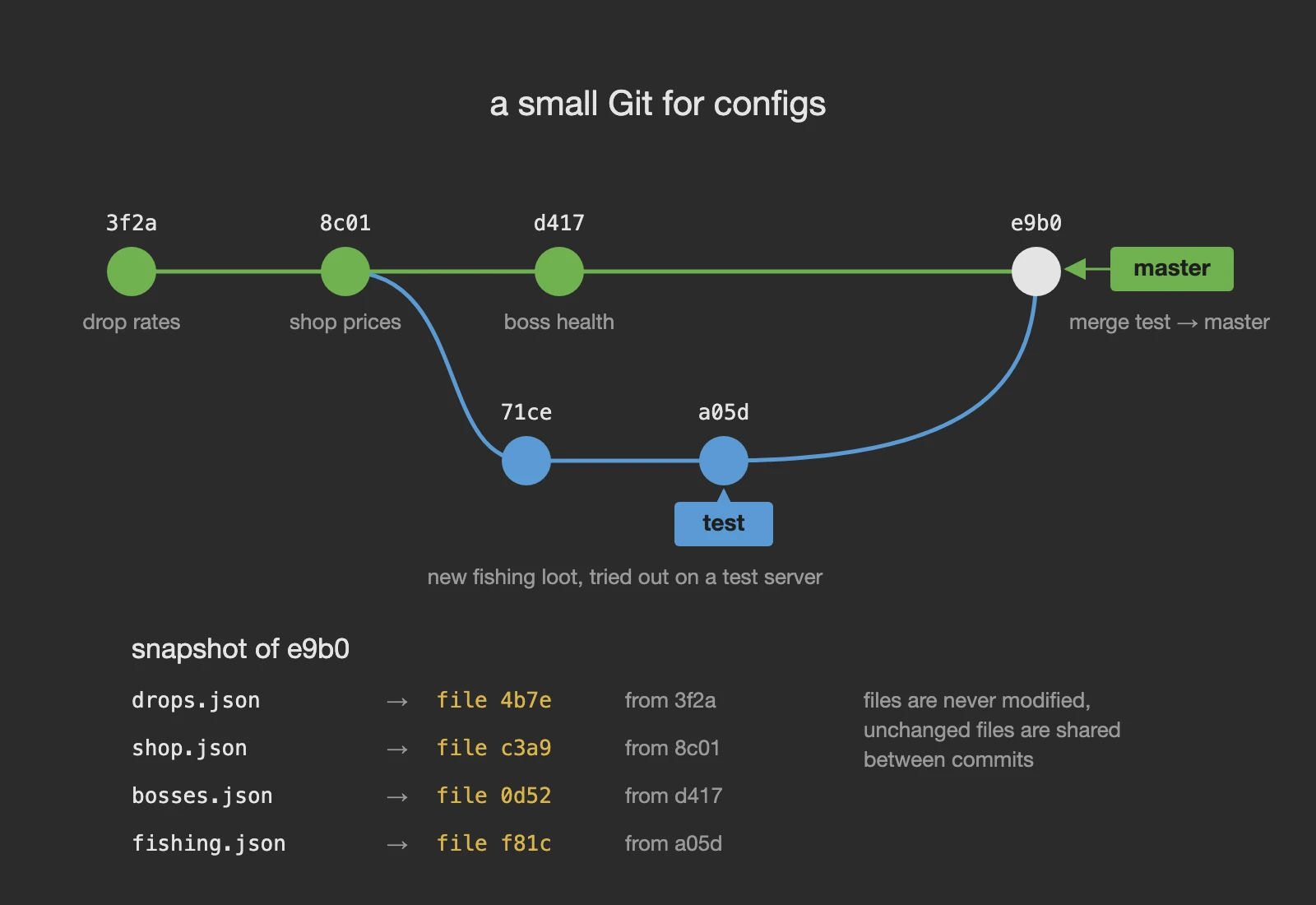
Git already solves these problems for code, so I built a small version of Git for configs.
How it's stored
Each version of a config file is stored once in MongoDB under a random UUID and is never modified. A snapshot maps the name of each config to the file ID of its current version (plus a hash of its contents). A commit is a snapshot with its parent commit(s), an author, a message, and a timestamp, and a branch is just a name pointing at a commit.
class GameConfigSnapshot(
    val configs: MutableMap<String, UUID>, // Map from config ID to file ID
    val hashes: MutableMap<String, Int> // Map from config ID to hash
)

data class GameConfigCommit(
    val id: UUID = UUID.randomUUID(),
    val parents: Set<UUID>,
    val author: String = "Unknown",
    val message: String = "No message provided",
    val timestamp: Long = System.currentTimeMillis(),
    val snapshot: GameConfigSnapshot
)
Committing
Modules register a loader and a saver for each of their configs. The saver turns the live config back into JSON, so finding out what changed is just a matter of hashing what the savers produce and comparing it to the hashes in the branch head. Committing looks like this:
- Edit some configs in-game
/config changesto see which configs changed/config commit "<message>"and pick which of the changed configs to include in the GUI- MasterControl stores the new files and adds the commit to the branch
- MasterControl pushes the new head to the game servers
- Each server compares hashes again and only reloads the configs that actually changed
As a result, a commit goes live on the whole network almost instantly (and without a restart).
A server can also be set to protect its local changes. In this mode, a server with its own uncommitted edits to a config that someone else just committed will not overwrite them. The person who committed then gets a list of the servers that were not updated.
Branches and merging
Each server runs on a branch, which is normally master. We can put a test server on its own branch, try changes out there, and merge them into master once they are ready. Merging works per config file, rather than per line like Git does. A file that only one side changed is taken from that side, and a file that both sides changed is a conflict. But what counts as "changed"? This is decided by history, where a version wins if the other side's version appears somewhere in its ancestry.
fun mergeFiles(name: String, other: GameConfigCommit, structure: GameConfigStructure): UUID {
    val id = snapshot[name]
    val otherId = other.snapshot[name]
    // ...
    if (id == otherId) return id

    // Calculate the version history of both
    val thisVersions = versions(name, structure)
    val otherVersions = other.versions(name, structure)

    if (id in otherVersions) return otherId
    if (otherId in thisVersions) return id

    // Changes to both files, merge error
    throw MergeConflict(MergeConflictType.DIVERGENCE)
}
Conflicts open a GUI where you click on each conflicting config to pick which branch to take it from.
Undo/config log shows the history, and /config diff shows which configs a commit touched (and optionally the full before and after). Rolling back works like git revert, in that it makes a new commit with the old snapshot. This way the bad change stays in the history and can be looked at later. It is also possible to check out older commits, including with the HEAD~N syntax.
A recent fix
In September 2026 I noticed that the game servers were holding the entire config history in memory. After 2,050 commits this came to about 50MB of heap per server, doing absolutely nothing. I changed it so the game servers only keep the head commit of each branch, and they ask MasterControl for older commits when a command actually needs them. This took the config store on each server from about 50MB down to about 50KB.
8.3 Captchas and Macro Checks
Grinding on your island (mining, farming, fishing, and slaying mobs) is a big part of the economy. It is also extremely repetitive, making it the perfect target for macros (little programs that click and move the mouse for you while you sleep). A player using a macro out-earns other players and slowly inflates the economy, so we need to catch them.
Random captchas
I gave each grinding action a small chance of triggering a captcha. The chance depends on how often the action happens, with 1 in 1,800 for mining, 1 in 240 for fishing, 1 in 10,000 for slaying, and 1 in 15,300 for farming (farming happens a lot). After passing one, there is a 3 minute grace period so the player does not get two in a row.
Minecraft doesn't really have text input boxes, so the captcha is drawn onto a map item. To draw it, the server renders a 128x128 image with Java2D, starting with random coloured ellipses for noise, and then 4 characters in random colours at random heights. I left the characters that are easy to mix up (like 0 and O, or 1, l, and I) out of the character set.
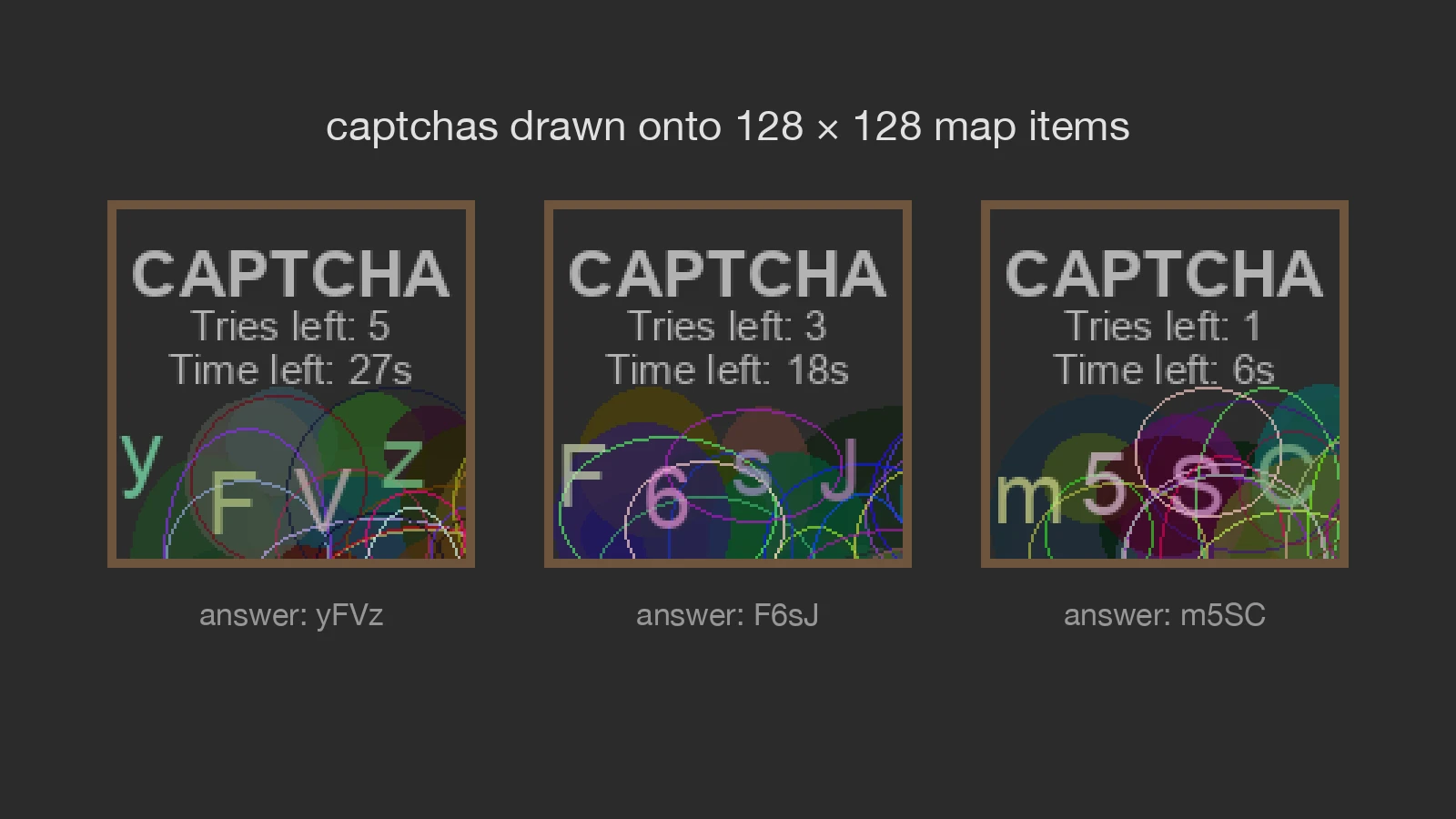
When a captcha is triggered:
- The player's inventory is saved and the slots are filled with the map
- The player is rotated to look straight down (this makes the map in their hand fill the screen)
- Clicks, drops, and interactions are cancelled
- The timer of a timed island mission is paused, if the player is on one
- The player types the answer in chat (or with
/inputif they are muted), with 5 tries and 30 seconds
A failed captcha is followed by another one, up to 3 in total. Staff get an alert for each failure with a "[CLICK TO TELEPORT]" button, and failing the third one kicks the player.
Aim checks
Fishing has a second kind of check as well (1 in 160 catches). Red blocks appear one at a time around the player's crosshair, and they have 10 seconds to look at each of them. The targets are fake entities sent with packets, so only that player can see them. They are placed relative to the player's eyes, so they follow along if the player walks around. However, turning your head does not move them (otherwise you would never be able to aim at them).
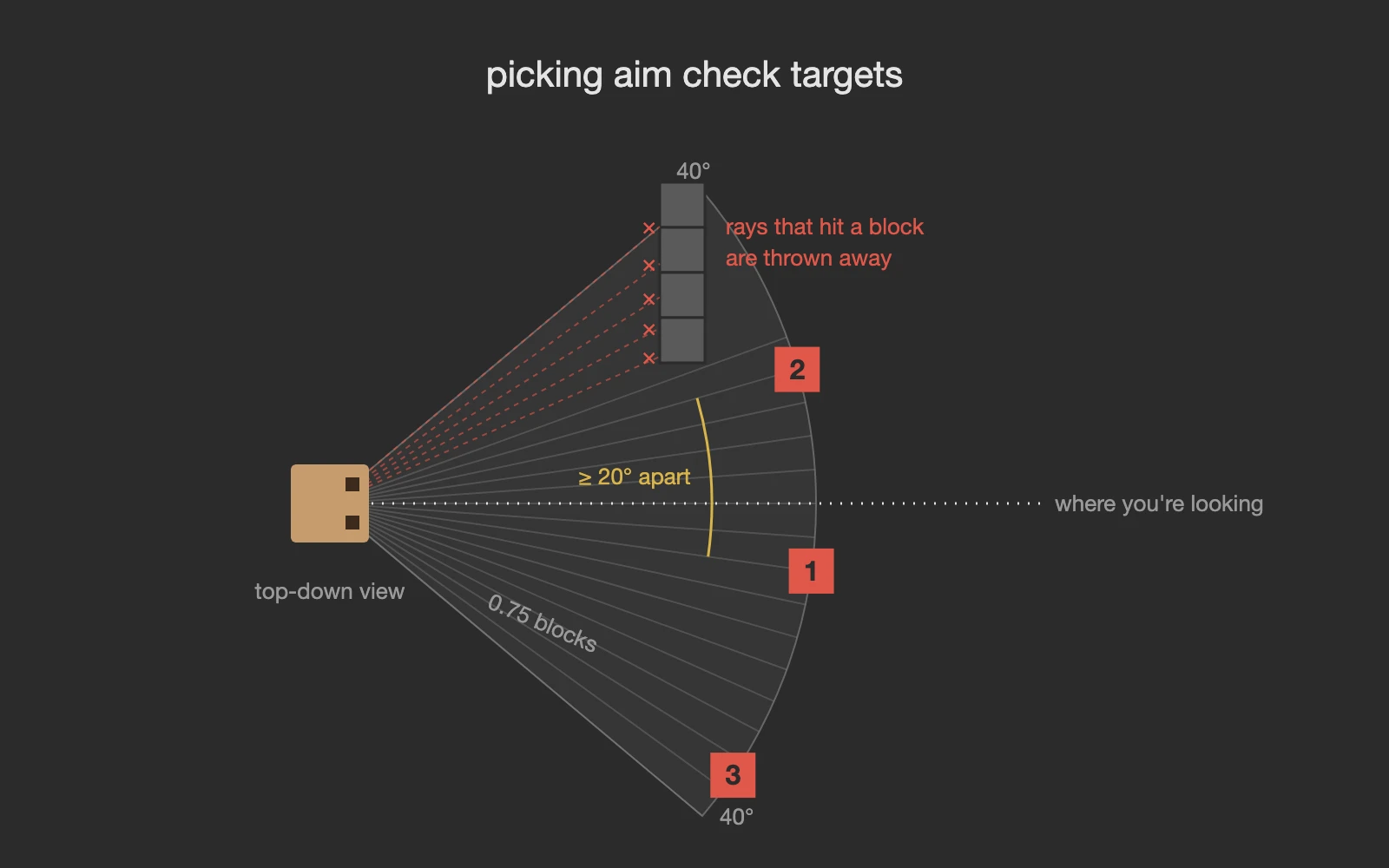
Placing the targets takes a bit of care. They sit 0.75 blocks from the player's eyes, within 40° of where they are looking, and at least 20° away from the previous target. Candidate directions are also raycast against the world, so a target is never placed inside a wall. In the case that the player is fishing somewhere too enclosed to fit 3 targets, they get a normal captcha instead, along with a message asking them to fish somewhere more open.
8.4 Dupe Detection
Most of our valuable items are unique, meaning each one carries its own UUID. If two items ever share a UUID, one of them is a dupe. A dupe monitor runs once a second and:
- Checks a random online player's inventory for repeated IDs
- Checks two random players' inventories combined (this catches a duped item that was handed to a friend)
- 5% of the time, checks the containers on a random loaded island
On top of that, when someone clicks in an inventory, both of the inventories involved get checked. Either way, dupes that it finds are posted to staff chat and the dupe log. They also send an urgent push notification to my phone (with ntfy). From there, we can usually run /logs all 7d item=<id> to find exactly where the dupe came from. I also made a command to strip duplicates out of the containers in a world, which keeps an undo in case it removes the wrong thing.
8.5 Chat Moderation
The filter
The word filter has two lists, severe and mild. Severe words are always censored, while mild words are only censored for players who have the filter turned on. The filter checks each substring up to the length of the longest word. It also checks them with spaces and punctuation removed, so "b a d w o r d" and "b.a.d.w.o.r.d" get caught too. The filter also deals with caps, by lowercasing messages that have more than 10 capital letters.
The word list lives on MasterControl, and the game servers check a hash of the list once a second and download the new list when the hash changes.
AI suggestions
Back in February 2023 I added an AI step to help the list keep up with players, since they are very creative with spellings:
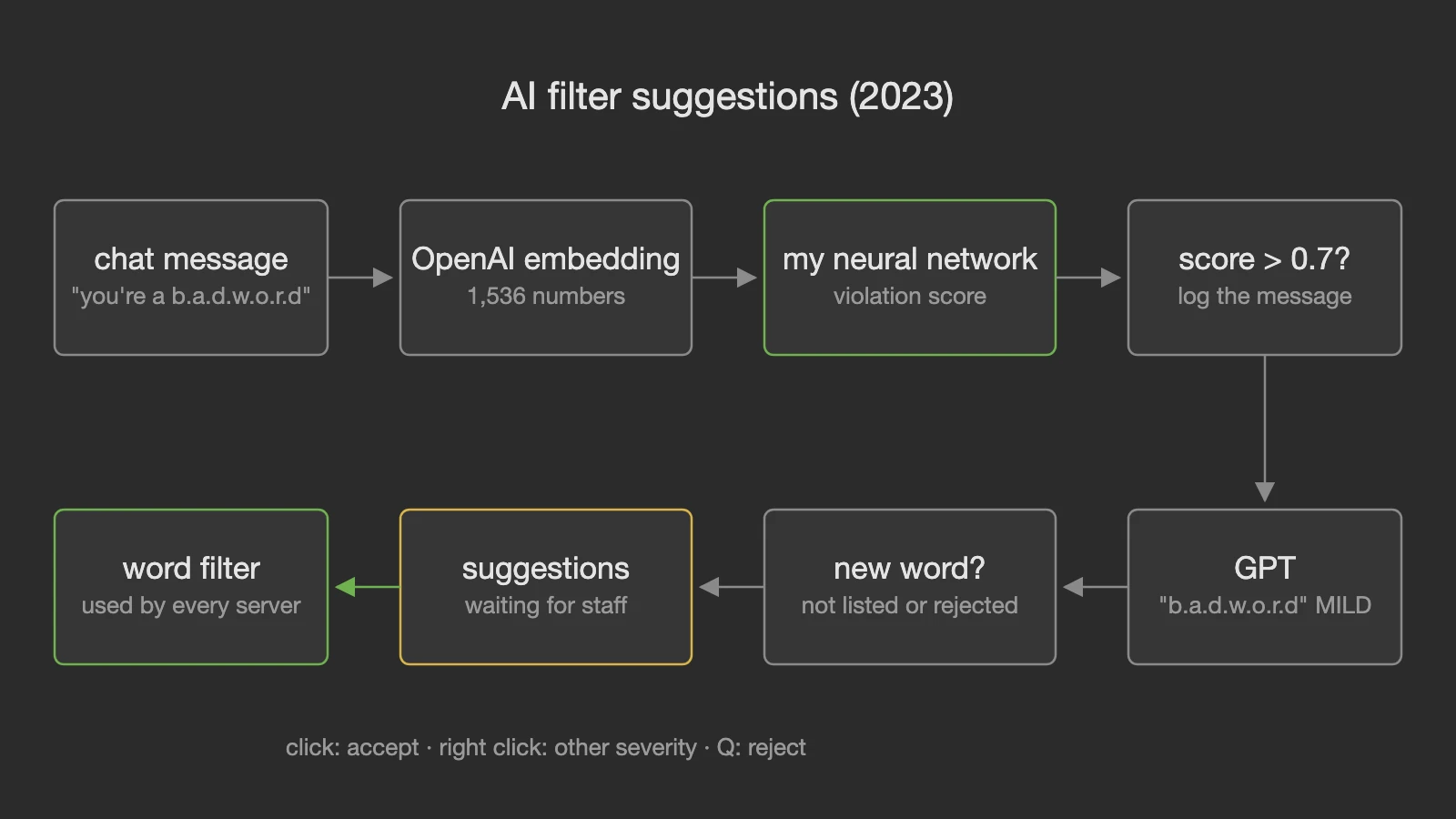
- Chat messages were turned into an embedding with OpenAI's API
- The embedding went through a small network built with my Java Neural Network library, which scored how likely the message was to be a violation
- When the score was over 0.7, the message was logged, and GPT was asked to pick out the profane words and rate each one MILD or SEVERE
- Words that were not already in the list (or previously rejected) went into a suggestions list
- Staff go through the suggestions in a GUI, where they can click to accept, right click to accept with the other severity, or press Q to reject
This let the filter learn new spellings over time, while a person still made the final call. The AI part has since been retired, but the words it suggested that staff accepted are still in the filter today. GPT is also still used to check alliance names and chest shop text, by asking whether the text is offensive and expecting a yes or no.
Still much more to write... TODO